 12, Oct 2026
How Much Should a Professional Website Cost in the US in 2026?
Read More
12, Oct 2026
How Much Should a Professional Website Cost in the US in 2026?
Read More
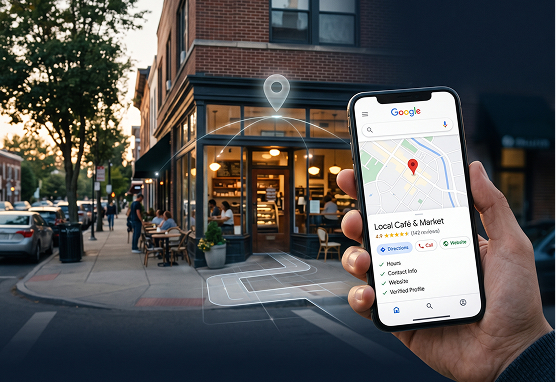
For a small business, appearing when someone searches for a product or service nearby can be more valuable than simply generating more website traffic. A customer searching for “dentist near me”, “plumber in Austin”, or “coffee shop open now” already has a reason to take action.
That is where local SEO becomes important.
One of the most important parts of local search visibility is your Google Business Profile. It gives customers essential information about your business directly through Google Search and Google Maps, including your location, opening hours, website, phone number, photos, reviews, and other business details.
For US small businesses competing in their local markets, keeping this profile accurate and useful should be part of the wider SEO strategy.
Here is a practical Google Business Profile checklist to work through.
The first step is making sure you actually control your business profile.
Google recommends that eligible businesses claim and verify their profiles. Verification helps establish that you are authorised to represent the business and allows you to manage the information customers see.
If your profile has not been claimed, start there before worrying about more advanced local SEO work.
Checklist:
Your business information should be accurate and consistent.
At a minimum, check your:
Google states that complete and accurate information can help businesses appear in relevant local searches.
This is especially important for small businesses. If a potential customer cannot quickly work out where you are, when you are open, or how to contact you, they may simply choose another business.
For service-area businesses, make sure the service area accurately reflects where you actually operate. Google allows eligible businesses that travel to customers to use service areas rather than displaying a customer-facing address.
Your primary category helps Google understand what your business does.
Do not choose a category simply because it contains a keyword you want to rank for. Choose the category that best represents your actual business.
You can also add relevant secondary categories when they accurately describe your services.
For example, a business that primarily operates as a bakery should not select a completely different category simply because it has higher search demand.
The goal is relevance.
Your business description should tell potential customers what you do without turning into a list of keywords.
Explain:
Avoid stuffing phrases such as “best dentist in Chicago” repeatedly into the description. Local SEO works better when your business information is clear and genuinely useful.
Your Google Business Profile should support your website and wider online presence, not read like an SEO exercise.
If your business offers multiple services, make sure they are clearly represented in your profile where the relevant features are available.
For example, a law firm could list immigration law, family law, estate planning, or business law. A dental practice might list general dentistry, cosmetic dentistry, dental implants, and teeth whitening.
This gives potential customers a clearer idea of what you offer and can help Google better understand the relevance of your business to searches.
Visual content can make a local business profile much more useful.
Add high-quality, genuine photos of:
Google specifically recommends adding photos and videos to help customers understand what a business offers.
For a restaurant, this could mean photographs of the dining area and food. For a construction company, it could mean completed projects. For a medical practice, it could mean photographs of the facility and professional environment.
The content should represent the real business rather than relying entirely on generic stock imagery.
Reviews are an important part of local visibility and customer decision-making.
Ask genuine customers to leave reviews after they have used your product or service. Make the process straightforward by providing a direct review link or QR code where appropriate.
Just as importantly, respond to the reviews you receive.
A simple response can acknowledge positive feedback, while a thoughtful response to negative feedback can show that the business takes customer concerns seriously.
Google notes that responding to reviews demonstrates that you value customer feedback, while reviews and positive ratings can contribute to local prominence.
Never buy fake reviews or create reviews yourself. The goal is to build genuine trust.
Your Google Business Profile should send customers to the most relevant page on your website.
For most businesses, that will be the main website. But if Google allows a more specific link for a particular action, use it where appropriate.
For example:
Restaurant → Menu or booking page
Hotel → Reservations page
Dental practice → Appointment page
Service business → Contact or service page
The goal is to reduce the number of steps between a local search and a customer taking action.
Few things damage the customer experience faster than inaccurate opening hours.
Review your normal hours regularly and update special hours for:
Google’s Business Profile system can also receive information from other sources and users, so businesses should regularly check their profiles for changes or updates.
Your Business Profile is only one part of local search.
Your website should reinforce the same information.
Make sure your website clearly communicates:
Create useful location or service pages when they genuinely help customers. Avoid creating dozens of nearly identical pages simply by changing the city name.
Google’s spam policies specifically warn against producing large amounts of unoriginal content primarily to manipulate search rankings.
Check that your business name, address, phone number, website, and other important details are consistent across your website and relevant business listings.
Google uses information from multiple sources when building local search information, including websites, third-party data, users, and business owners.
If your website says one thing while important business listings say something else, it can create unnecessary confusion.
Local SEO is not simply about adding the name of your city to every page.
Google says local results are primarily influenced by relevance, distance, and prominence.
That means your strategy should consider the actual areas you serve, the services customers are searching for, your reputation, your website, and the overall authority of your business.
For example, a roofing company serving Dallas should build useful content around roofing services and the areas it genuinely serves, rather than creating dozens of pages targeting every city in Texas.
Before considering your profile complete, check:
✓ Business claimed and verified
✓ Business name is accurate
✓ Correct primary category selected
✓ Relevant secondary categories added
✓ Address or service area is accurate
✓ Phone number is correct
✓ Website link works
✓ Opening hours are updated
✓ Services are listed
✓ Business description is clear
✓ Recent, genuine photos added
✓ Customer reviews are being managed
✓ Reviews are receiving appropriate responses
✓ Website information matches your business details
✓ No duplicate or misleading profiles
A well-managed Business Profile does not guarantee a top position in local search. Google does not offer a way to pay for better organic local rankings, and rankings depend on multiple factors.
What it can do is give Google and potential customers clearer, more reliable information about your business.
For small businesses, that matters because local search often happens when someone already has a need. They may be looking for a nearby service, checking opening hours, comparing businesses, reading reviews, or deciding where to make an enquiry.
That is why local SEO should go beyond simply creating a profile.
Your Google Business Profile, website, reviews, local content, technical SEO, and wider digital presence should all support the same goal: making your business easier to find and easier to choose.